
Pharmacy thermal labels look simple, but a lot goes into getting them right. The stock has to suit your printer, the roll has to feed cleanly, and the finished label has to stay readable from the counter to the kitchen table. AllLabels, a label manufacturer in Surrey, BC, makes pharmacy thermal labels for roll-fed systems in receipt and patient information formats. This guide explains how pharmacy thermal labels work, where pharmacies run into trouble, and how AllLabels helps pharmacies in BC, Edmonton and across Canada get a thermal label that fits their setup.
Along the way, you will see how AllLabels handles formats, materials and printer matching, and what to have ready before you ask for a quote. Whether you are setting up a new counter or replacing your current supplier, the goal is the same: pharmacy thermal labels that run without fuss.
Pharmacy Thermal Labels: How They Work and Why the Details Matter
Thermal printing creates an image with heat instead of liquid ink or toner. That makes pharmacy thermal labels a popular choice for roll-fed systems, where a printer sits at the counter and prints one label at a time. Two methods are in common use, and the difference matters when you order.
Direct thermal printing
Direct thermal printers apply heat to specially coated label material, and the coating darkens where it is heated. There is no ribbon involved. The label material itself does the work, so the stock you choose has to be made for direct thermal use.
Thermal transfer printing
Thermal transfer printers heat a ribbon, which transfers its colour onto the label. This method needs both a compatible label material and a matching ribbon. Because the ribbon is a separate consumable, ribbon and material options both affect the final result.
Why pharmacies care
A prescription label is read by patients, caregivers and sometimes several people in the same household. Pharmacy thermal labels need to be clear, to stay put on the bottle, and to feed through the printer without jams. When any one of those fails, the counter slows down and the patient notices.
The supplier’s role
Your dispensing software decides what prints on the label, and your regulator decides what the label must carry. A label manufacturer does not change either of those. What a supplier controls is the physical product: size, material, roll format and how well it matches your printer. That is where AllLabels focuses.
→ Wondering whether your counter printer is a thermal model? Check the printers AllLabels supports before you choose a label format.
What AllLabels Makes: Pharmacy Thermal Labels in Receipt and Patient Information Formats
AllLabels produces thermal-compatible labels for roll-fed systems. Two formats cover most pharmacy counters, and both work with direct thermal and thermal transfer printers.
Receipt format
Receipt-style pharmacy thermal labels suit counters that print transaction details on a roll. AllLabels makes them as part of its thermal-compatible range for roll-fed systems.
Patient information format
Patient information labels carry the details a patient takes home. AllLabels offers this format on thermal-compatible rolls, so a pharmacy can choose the layout that matches its workflow.
Ribbon and material options
Because thermal printing depends on the pairing of material and, in thermal transfer, ribbon, AllLabels offers ribbon and material options. If you are not sure which combination suits your printer, share your printer model and the AllLabels team can guide the choice.
Roll details that affect feeding
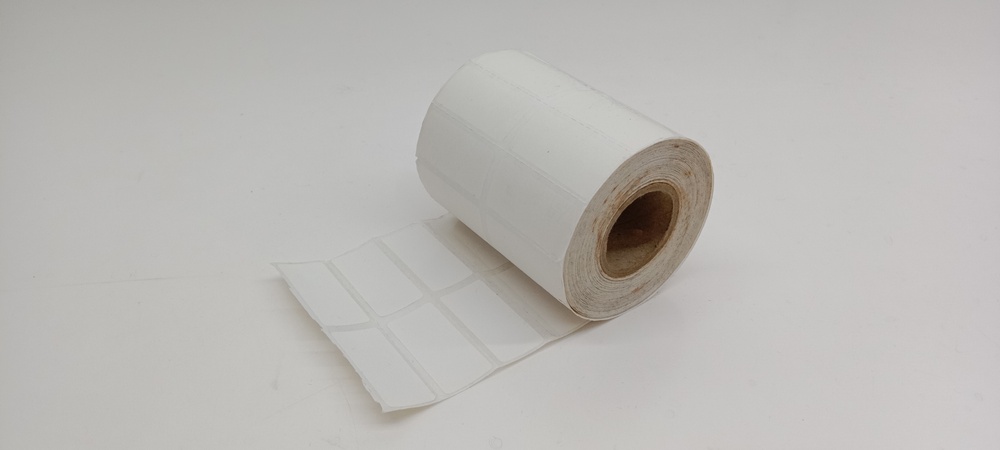
AllLabels roll labels come with 1, 2 or 3 inch cores, inside or outside wind, and custom sizes and quantities. When you share your printer or dispenser model, AllLabels matches the unwind direction and core size to it. A mismatch here is one of the most common causes of poor feeding, so it is worth settling before the first order.
Finish and adhesive
Standard AllLabels rolls have a matte finish and permanent adhesive. They suit hand or machine application.
→ Not sure which thermal format fits your counter? See the full range of pharmacy labels AllLabels makes.
Common Problems With Pharmacy Thermal Labels and How AllLabels Helps Avoid Them
Most trouble with pharmacy thermal labels comes from a handful of mismatches. Knowing them in advance saves time and wasted stock.
Stock made for the wrong print method
Direct thermal material and thermal transfer material are not interchangeable. Putting the wrong one in a printer gives poor or missing print. AllLabels works from your printer type so the material and ribbon fit how you print.
Core size and unwind direction
If the roll does not match the printer or dispenser, labels may feed unevenly or not at all. AllLabels matches core size and unwind direction to your model when you share it.
Label size that does not suit the layout
When the label is smaller than the layout your software prints, text can be cut off or crowded. AllLabels makes custom sizes, so the label can be made to match your template instead of the other way around.
Artwork that is not print ready
If your labels carry a logo or custom layout, the file needs to be clean. The AllLabels guidelines ask for a press-ready PDF and explain the difference between vector and raster artwork. Preparing the file properly at the start prevents delays later.
Switching suppliers without a plan
Changing label suppliers feels risky when the counter depends on the stock. Sharing your printer model, software and current label size up front gives AllLabels what it needs to recommend a format that fits what you already run.
→ Want to avoid a feeding problem on your next roll? Read the AllLabels file guidelines before you submit artwork.
How AllLabels Takes Pharmacy Thermal Labels From Request to Delivery
AllLabels follows a documented production process on every job. That consistency is what lets a pharmacy reorder pharmacy thermal labels and expect the same quality next time.
Step 1: Job intake and assessment
The AllLabels team reviews your request and creates a job ticket, so everyone works from the same details.
Step 2: Prepress
Prepress includes file checks, colour adjustments and page layout. Knowledgeable prepress support catches problems before they reach the press.
Step 3: Proofs for approval
You receive a proof and approve it before printing. Changes cannot be made once production begins, so this is the moment to confirm the size, layout and content.
Step 4: Printing with quality monitoring
Production runs with quality monitored during printing.
Step 5: Inspection, finishing and delivery
Labels go through a quality control inspection and finishing, then are packaged for delivery or pick-up. AllLabels ships Canada-wide.
Equipment built for consistency
AllLabels produces labels locally in Canada on brand-new press and tooling, which supports consistent quality from one order to the next. The shop runs EFI Jetrion 4950LX and Xeikon PX3300 digital presses, traditional flexo and an in-line laser die-cutter with inline finishing. Digital printing removes plates and make-ready, which lowers setup costs on shorter runs.
→ Curious how a thermal roll gets made? Follow the AllLabels process from intake to delivery.
AllLabels Pharmacy Thermal Labels and Your Dispensing Software
Your software generates the label content, and the printed label has to work with it. AllLabels is compatible with Kroll and WinRx, and it also supports Nexxsys, Flexipharm, TELUS Health and other platforms.
Kroll pharmacies
If you use Kroll, the Kroll pharmacy page shows how AllLabels supports that platform.
WinRx pharmacies
WinRx pharmacies can review the WinRx pharmacy page for details on how AllLabels fits that setup.
Other platforms
AllLabels regularly supports pharmacies using Nexxsys, Flexipharm and TELUS Health. If your platform is not listed, tell the team which software and printer you use and they can recommend a format.
Sheet labels if you also print on a laser
Some pharmacies run thermal at one station and laser at another. AllLabels makes pharmacy laser labels in custom layouts, and it is Lexmark, Canon and HP certified. You can read more about prescription bottle labels and how to print prescription labels as well.
→ Running a platform that is not on the list? Tell the AllLabels team which software and printer you use.
Custom Branding on Pharmacy Thermal Labels From AllLabels
Many pharmacies want the label to carry their name. AllLabels offers custom printing in one to four colours, including your pharmacy name, logo, contact details and layout. Generic and blank options are available if you prefer to keep things plain. If you are exploring branding in more depth, see AllLabels’ pages on custom prescription labels and blank pharmacy labels.
Keep the layout readable
On a thermal label, space is limited. A clear layout helps patients find the details they need. AllLabels’ prepress team can check your file before it goes to print.
Meet your regulator’s rules separately
AllLabels prints the content your software and pharmacy supply. It does not write or audit pharmacy label content. Confirm what your labels must carry with NAPRA, the College of Pharmacists of BC or the Alberta College of Pharmacy, depending on where you operate.
→ Want your pharmacy name on every thermal label? Request a quote from AllLabels with your branding and printer details.
How to Order Pharmacy Thermal Labels From AllLabels
Ordering goes faster when you come prepared. Gather these details before you contact AllLabels.
Your printer model and print method
Know whether your printer is direct thermal or thermal transfer. This determines the material and whether a ribbon is needed.
Your software platform
Name your dispensing software so the team can match the format to it.
Roll details
Note the core size, wind direction and label size you use now. If you are not sure, share your printer or dispenser model instead.
Material and artwork
The quote form lists material options including paper, vinyl, clear, BOPP and foil. It also asks whether you have a design ready and whether you want design assistance. Send a press-ready PDF if you have one, and use file sharing for large files.
Review the proof
Check size, layout and content on the proof, since changes cannot be made once production begins.
→ Ready to price your thermal rolls? Start your AllLabels quote with your printer, size and material.
Working With AllLabels in Surrey, BC and Across Canada
AllLabels has been in business for more than a decade. It serves the Lower Mainland from Unit 145, 15355 68th Avenue, Surrey, BC, and ships Canada-wide, which includes pharmacies in Edmonton. For pharmacies that want a local Canadian manufacturer with a documented process, prepress support and consistent production, AllLabels is built for that.
The work divides cleanly. Your regulator sets the rules, your software supplies the content, and AllLabels turns it into pharmacy thermal labels that suit your printer. You can follow AllLabels on Instagram and Facebook.
→ Ready to move your counter to pharmacy thermal labels that fit? Contact the AllLabels team in Surrey today.
Pharmacy Thermal Labels and AllLabels: Frequently Asked Questions
What pharmacy thermal labels does AllLabels make?
AllLabels makes thermal-compatible labels for roll-fed systems, including receipt and patient information formats, with ribbon and material options.
Do AllLabels thermal labels work with direct thermal and thermal transfer printers?
Yes. AllLabels thermal-compatible labels are compatible with both direct thermal and thermal transfer printers.
Can AllLabels match the roll to my printer?
Yes. Share your printer or dispenser model and AllLabels matches the unwind direction and core size to it. Cores come in 1, 2 or 3 inch sizes.
Which pharmacy software does AllLabels support?
AllLabels is compatible with Kroll and WinRx, and it also supports Nexxsys, Flexipharm, TELUS Health and other platforms.
Can I add my pharmacy name and logo to thermal labels?
Yes. AllLabels offers custom printing in one to four colours, as well as generic and blank options.
Can AllLabels make custom label sizes?
Yes. Roll labels come in custom sizes and quantities.
Does AllLabels ship to Edmonton?
AllLabels ships Canada-wide, so pharmacies in Edmonton can order from the Surrey location.
Will I see a proof first?
Yes. AllLabels sends proofs for approval before printing, and changes cannot be made once production begins.
How does AllLabels keep quality consistent?
AllLabels uses brand-new press and tooling, produces locally in Canada and monitors quality during printing.
Does AllLabels also make laser sheet labels?
Yes. AllLabels makes pharmacy laser labels in custom layouts, and it is Lexmark, Canon and HP certified.
How do I get a quote?
Use the AllLabels quote form